
For a project for the Create Block Theme plugin, I created a new REST API endpoint that needs to be tested before it can be used with the a future UI feature.
The task was to “Smoke test from a REST client (Postman / cURL) against the endpoint with a small payload”
I used three increasingly thorough payloads, plus the cURL commands. But before doing that I needed an application password.
Application password via Studio CLI
Whatever Studio shows in the site sidebar (e.g., http://localhost:8897).
Studio app > site > “Open in terminal” (or the menu’s “Open site shell”). Inside that shell, studio wp is on $PATH and already targets the site.
Generate an Application Password
studio wp user application-password create admin \"cbt-smoke-test\" --porcelain 2>&1 | tail -10"| Piece | What it does |
|---|---|
studio wp | Studio’s CLI wrapper. Runs WP-CLI inside the Studio site’s PHP environment (since Studio uses PHP-WASM, plain wp doesn’t work — see your STUDIO.md). |
user application-password create | The WP-CLI subcommand that creates a new Application Password for a user. |
admin | Which user to create it for (login name). |
"cbt-smoke-test" | The label/name for the password — shows up in Users ? Profile ? Application Passwords so you can identify and revoke it later. |
--porcelain | Tells WP-CLI to print only the generated password (one line, no table, no “Success:” prefix). Makes it scriptable. |
2>&1 | Redirects stderr into stdout. Means any error messages (which WP-CLI prints to stderr) end up in the same stream you’re tailing. |
| tail -10 | Pipes the output to tail, which keeps only the last 10 lines. Studio’s studio wp is chatty during startup (“Loading site…”, spinners, daemon messages) — tail -10 strips that noise so you see just the result. |
Copy the password it prints. Use it as APP_PASS below.
WP_URL="http://localhost:8888"
APP_USER="admin"
APP_PASS="paste-from-above"
Testing REST API calls from the PR
Payload A — Trivial (single palette color)
curl -sS -u "$APP_USER:$APP_PASS" \ -X POST "$WP_URL/wp-json/create-block-theme/v1/theme-settings" \ -H "Content-Type: application/json" \ -d '{ "settings": { "color": { "palette": [ { "slug": "brand", "name": "Brand", "color": "#0066ff" } ] } } }' | jq .status- Expected: “SUCCESS”.
- Then check ~/create-block-theme/…
- active-theme…/theme.json —
- settings.color.palette should now contain brand.


Payload B — Toggle a default + add a custom template
curl -sS -u "$APP_USER:$APP_PASS" \
  -X POST "$WP_URL/wp-json/create-block-theme/v1/theme-settings" \
  -H "Content-Type: application/json" \
  -d '{
    "settings": {
      "color": { "defaultPalette": false }
    },
    "customTemplates": [
      { "name": "page-wide", "title": "Wide Page", "postTypes": ["page"] }
    ]
}' | jq .theme_json.customTemplates- Expected:
- response echoes the new
customTemplateslist. - Reload Site Editor ? templates picker should offer “Wide Page” for pages.
- Default palette is removed from the Styles > Colors pane


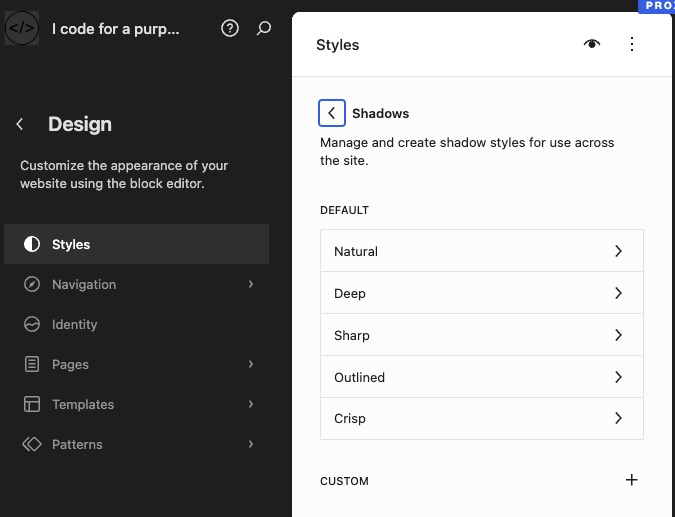
Payload C — Shadow reification (the operational key)
curl -sS -u "$APP_USER:$APP_PASS" \
  -X POST "$WP_URL/wp-json/create-block-theme/v1/theme-settings" \
  -H "Content-Type: application/json" \
  -d '{
    "removedShadowDefaults": ["natural", "sharp"]
}' | jq '.theme_json.settings.shadow'- Expected:
- response shows
defaultPresets: falseandpresetswith the 3 kept core defaults (Deep, Outlined, Crisp) materialized. - Run the same command twice — the result should be identical (idempotency check).
- Then in the editor, the shadow picker should expose only those 3.

Quick error case
curl -sS -u "$APP_USER:$APP_PASS" \
  -X POST "$WP_URL/wp-json/create-block-theme/v1/theme-settings" \
  -H "Content-Type: application/json" \
-d '{ "totallyMadeUp": true }' | jq .This is part of my project for Automattic’s Radcial Speed Month: Make create-block-theme plugin the theme builders companion.
The major pieces:

Leave a Reply