
The WordPress developer blog hosts many tutorials for developers and theme builders. For some tutorials, writers need to build example plugins to demonstrate concepts in the proper context
A few days ago I assigned myself the topic How to add a menu item to the Preview drop-down.
The example plugin
So first I worked on an example plugin which helps readers to see the whole context. It took some back-and-forth with Claude to simplify and focus it. The plugin creates a social card preview for “X” and adds a social card preview menu to the Preview drop-down.
The draft of the blog post
Then I asked Claude to draft a blog post to explain the code and to create it in block notation. This way, when I copy/paste it to the final site for editing, I don’t have to reformat it.
This process would work well for future tutorials too. I would need a local site to hold all my drafts, which I’ll use until they’re ready for the Dev Blog review process. And I would want Claude to post the first draft and make updates.
Setting Up Content Abilities with MCP
For that to work I needed content abilities on the local WordPress instance. For now the Abilities API doesn’t list content edition capabilities. I needed to create a plugin to register those. Together with the WordPress MCP Adapter plugin I can connect the Abilities via MCP connector to Claude. Here’s the MCP configuration needed:
{
  "mcpServers": {
    "wordpress": {
      "type": "stdio",
      "command": "wp",
      "args": [
        "--path=/path/to/your/wordpress",
        "mcp-adapter", "serve",
        "--server=mcp-adapter-default-server",
        "--user=admin"
      ]
    }
  }
}Full process
The full process goes like this: building the example plugin, writing the first version of the article, and publish the draft to a local site in WordPress Studio, all without leaving the terminal. No more context switching along the way.
This diagram shows all the pieces together with Claude in the mix.
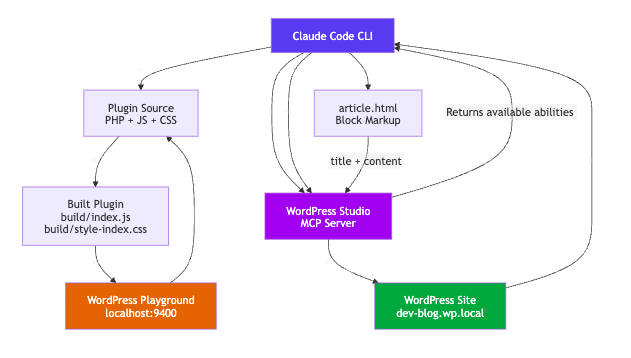
It might be a while before content capabilities to make it into WordPress Core. Lots to consider for hundreds of millions of websites.
In the meantime, if you need content capabilities for testing (not for production) on your WordPress site, you can use this plugin: Content Abilities. Jonathan Bossenger wrote an article on how to extend WordPress Abilities on the Developer Blog. Introducing the WordPress Abilities API. Followed by the post: From Abilities to AI Agents: Introducing the WordPress MCP Adapter
Oh, before I forget you’ll want to install the new collection of WordPress Agent Skills for your WordPress development work.
Feld also succeeded connecting Claude to his site and blogged about it. Claude help setting up OAuth and the verification flow and then uses the REST API to handle posts. No need for MCP or Abilities. Which is an interesting conclusion. WordPress already offers multiple ways for computers to interact with it.
Updated Feb 18, 2026
Editing process on the blog post
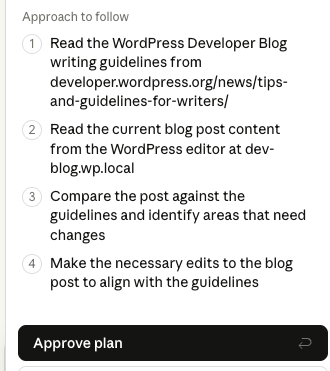
It another conversation with Claude code to actually hooked the repo up to the dev blog local site, to make some over all changes to the post before I could start a separate editing process.
For that I started the Claude Chrome Extension (still in beta). First I needed to make sure the post adheres to the Tips and Guidelines.
After this worked well, I created a skill for Claude Code to do the following:
- Writing guidelines — voice/tone (“you” not “we”), sentence case headings,
- short sentences, active verbs, WordPress Coding Standards for code
- Block markup format — templates for paragraphs, headings, code blocks, lists
- MCP workflow — how to use content/create-post, content/update-post,
- content/get-post, content/find-posts via the Studio server
- Sync procedure — diff-and-merge strategy that preserves Studio manual edits and only pushes local changes (exactly what we just did)
- Known issues — JSX mangling in code blocks, MCP connection troubleshooting
- Draft review checklist — passive voice, “we/us”, Title Case headings, oversized code blocks, missing alt text
- Files created:
- ~/.claude/skills/wp-dev-blog-writer/SKILL.md — main skill definition
- ~/.claude/skills/wp-dev-blog-writer/references/writing-guidelines.md — full official guidelines reference
Tools for this project
- WordPress Studio — local WordPress site (dev-blog.wp.local) for drafting the blog post
- MCP Adapter plugin (v0.4.1) — exposes WordPress abilities (CRUD for posts) as MCP tools over stdio
- Content Abilities plugin (v0.1.0) — registers the content/create-post, content/update-post, content/get-post, content/find-posts abilities
- WP-CLI (wp) — runs the MCP adapter server and manages the Studio site
- @wordpress/scripts (v30) — build tooling for the example plugin’s JS/CSS
- WordPress Playground CLI — disposable WP instance for testing the plugin (
npx @wp-playground/cli server --auto-mount) - Claude Code with the wordpress-studio MCP server — writes, edits, and syncs blog content between local article.html and the Studio draft post
The flow
- write the example plugin + article locally,
- build with @wordpress/scripts,
- test with Playground, then
- push the article to Studio via MCP for editing/publishing.

Leave a Reply to Block Theme Guide, AI Galore, Icon Block, WordPress 7.0 – Weekend Edition 357 – Gutenberg Times Cancel reply