Users of the WordPress Theme directory can navigate block themes with Style Variations and see how they change the look at feel of a layout.
The theme powering the WordPress repository uses WordPress Playground to load a site with the theme and its style variation and then takes a screenhost via the mshots API. The screenshots are stored on the server and make it possible to load style variations rapidly via the WordPress theme repository’s site.
Now mshots API, built and used by Automattic, is publically available. However it’s mostly used internally for WordPress.com and WordPress.org infrastructure, and not well documented. You could obtain the code on GitHub and follow the instructions to self-host it though.
For my explorations on what’s possible with Playground and how to use it to make screenshots, I teamed up with Cursor AI.
In this post, you’ll learn how to set up a Node.js server using Playwright to automatically generate screenshots of a fully-initialized WordPress Playground. You’ll also see how to trigger screenshots manually and use debug mode for troubleshooting.
The Challenge
Capturing a screenshot of a dynamic, JavaScript-heavy app like WordPress Playground isn’t as simple as taking a snapshot after the page loads. You need to ensure:
- The Playground iframe is present in the DOM.
- WordPress has fully initialized and rendered the site.
- The screenshot is taken at the right moment, not while the site is still “Preparing WordPress.”
The Solution
We use a two-part approach:
- A Node.js server (with Express and Playwright) that loads the Playground page, waits for it to fully initialize, and takes a screenshot.
- A simple HTML frontend that you can use for manual testing, debugging, or triggering screenshots with a button.
Key Features
- Fully automated: No manual browser interaction required for screenshots.
- Manual option: Open the page in your browser for debugging or interactive use.
- Debug mode: See what Playwright sees by launching the browser in non-headless mode.
- Robust waiting: Ensures the Playground is fully loaded before capturing.
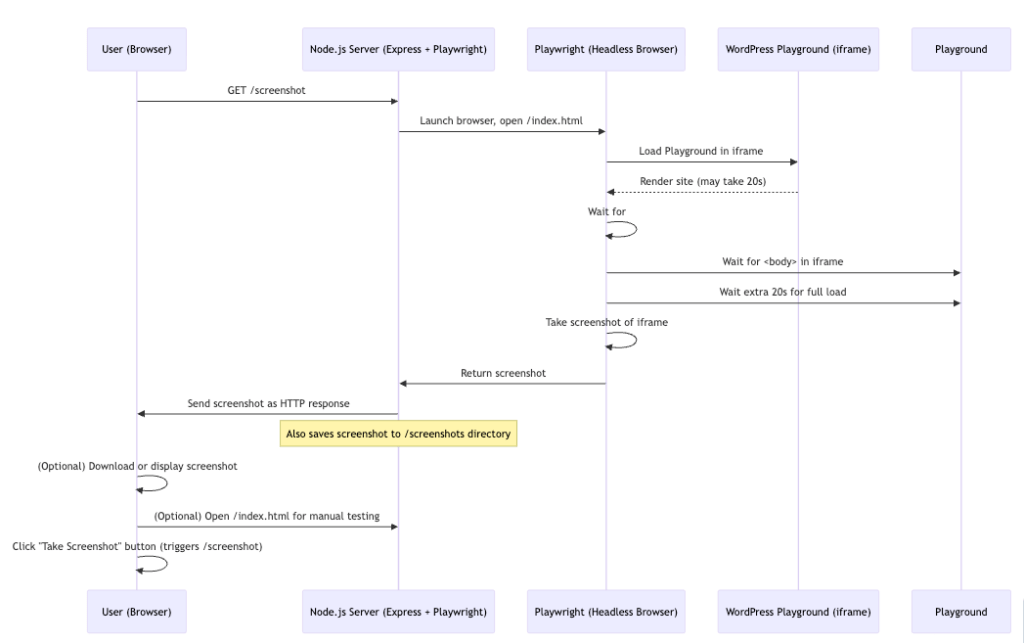
The code and instructions on how to use it all is on GitHub
https://github.com/bph/playground-for-screenshots
Caveat: This is only a proof of concept for educational purposes, mostly mine. The code was created together with Cursor AI. Please check for security and bugs before using any of this in production.
You could modify it to use with a dynamic playground blueprint for instance if you want to create a set of screenshot for a webdirectory. Or a list of demo sites for our products categories. Or for visual regression testing.
The blueprint is hardcoded in the index.html to show a screenshot of the theme demo of Twenty-Twenty-Five. Consult the WordPress Playground Blueprint API] documentation to modify things to your needs.

Leave a Reply to WP Weekly 242 – Experts – 100% Renewable Hosting, Scrub Video Action, Media Corps Ends Cancel reply