
The work on Playground is ongoing, and soon the wp-now cli will be replaced by the wp-playground cli. It’s still in early stages, so the documentation is basic. It allows me to start a Playground instance from the folder of a theme or plugin I’m working on. It is also helpful for testing a blueprint locally before sharing it publicly or uploading it to the Blueprint Gallery
Hard-Hat area. Enter at your own risk.
What follows is the context and the commands that worked for me. There is no guarantee it’ll be working in the future. This is all very much in flux and experimental.
My theme’s directory:
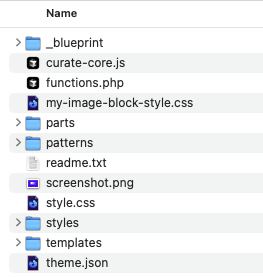
It’s a bare bones block theme, I use for testing code in tutorials. It has a functions.php, parts, patterns, templates, styles, a theme.json and js and css files.
It also has a /_blueprint folder with a blueprint.json to configure a Playground instance locally.
This is the code of the blueprint with the steps:
- install the Gutenberg and Create Block Theme plugins,
- activate the theme “plain-pauli’,
- automatically login as “admin” and
- set the User Meta data for the admin user (first name, last name, and admin color)
{
	"meta": {
		"title": "Editing Themes via site editor",
		"author": "bph",
		"description": "A blueprint to install create-block-theme and gutenberg plugins and activate plain-pauli theme",
		"categories": ["plugins", "themes"]
	},
	"steps": [
		{
			"step": "installPlugin",
			"pluginData": {
				"resource": "wordpress.org/plugins",
				"slug": "gutenberg"
			},
			"options": {
				"activate": true
			}
		},
		{
			"step": "installPlugin",
			"pluginData": {
				"resource": "wordpress.org/plugins",
				"slug": "create-block-theme"
			},
			"options": {
				"activate": true
			}
		},
		{
      "step": "activateTheme",
      "themeFolderName": "plain-pauli"
    	},
	{
		"step": "login"
	},
	{
			"step": "updateUserMeta",
			"meta": {
				"first_name": "Birgit",
				"last_name": "Pauli-Haack",
				"admin_color": "modern"
			},
			"userId": 1
		}
	]
}
The command starts with
npx @wp-playground/cli server = it installs the Playground as a server.
I used the --mount=<source>:<target> flag to mount specific host directories into the Playground’s virtual file system
Then I pointed it to the above blueprint file to configure the rest of the Playground instance.
npx @wp-playground/cli server --mount=.:/wordpress/wp-content/themes/plain-pauli --blueprint=./_blueprint/blueprint.jsonIt installs the playground cli server mounts
- the current folder indicated by the period “.”
- as indicated by the colon “:”
- theme folder /plain-pauli and
- uses the blueprint.json from the current folder’s sub folder “./_blueprint”
Here is a video on what’s happens when I use above command:
npx wp-playground/cli server --mount=./wp-content/themes/my-theme:/wordpress/wp-content/themes/my-themeThe general format to load a plugin look like this:
npx wp-playground/cli server --mount=./wp-content/plugins/my-plugin:/wordpress/wp-content/plugins/my-plugin Other flag can be added like the desired WordPress version in
--wp=6.5
or
--login
And advanced command could look like this:
npx wp-playground/cli server \
     --mount=./wp-content/plugins/custom-plugin:/wordpress/wp-content/plugins/custom-plugin \
     --mount=./wp-content/uploads:/wordpress/wp-content/uploads \
     --blueprint=./my-blueprint.json \
     --wp=6.5
As mentioned at the beginning, this is just a snapshot in time about the Playground CLI. It’s not officially released yet, and still under very active development. Use at your own risk.

Leave a Reply